
Advertisement
Nearly 85% of Americans say a smartphone or smart speaker is key in their daily lives. This shows how everyday technology has become essential.
Everyday technology includes digital devices, apps, and systems we use at home, work, and on the go. This includes smartphones, smart speakers from Amazon and Google, wearables like the Apple Watch, and streaming services like Netflix. It also includes online banking platforms and AI-driven assistants.
Big trends in technology include AI and IoT coming together, better privacy and security, and devices working together better. Modern gadgets focus on being easy to use and connecting well with other products.
These smart solutions offer many benefits. They save time, help track health, make home management easier, and improve finances. They also expand entertainment options and make learning easier. But, there are downsides like compatibility issues, costs for streaming and cloud services, and the need to protect personal data.
In the sections ahead, we’ll look at real products and services. From Amazon Echo and Nest thermostats to Mint, Peloton, and e-learning platforms. We’ll help you find technology that suits your lifestyle.
Smart Home Devices Revolutionizing Daily Life
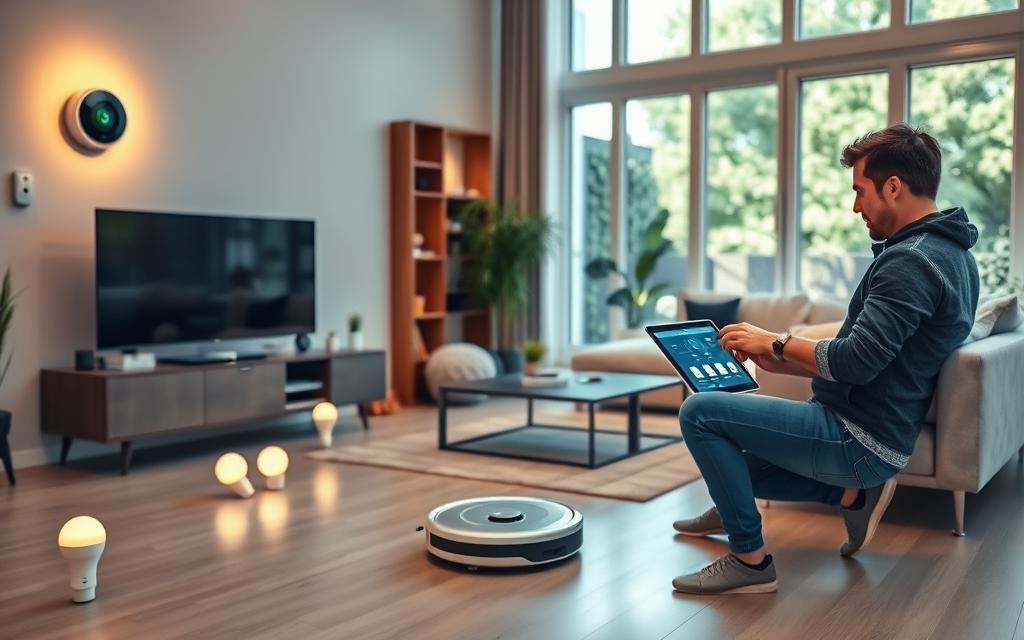
Smart home devices connect through Wi‑Fi, Bluetooth, Zigbee, or Thread. They make chores easier and save energy. These devices turn daily tasks into simple commands, making life easier.
Think of them as tech tools that enhance your home’s security, efficiency, and comfort. They work in the background to improve your life.
Voice-Activated Assistants
Amazon Alexa, Google Assistant, and Apple Siri let you control things with your voice. You can start your day by saying a command to turn on coffee, read the news, and adjust the thermostat.
Routines connect voice commands to devices like lights and thermostats. This makes home automation seamless. You can also control privacy with settings like microphone off switches and voice history management.
Smart Thermostats
Google Nest, ecobee, and Honeywell Home use smart tech to save energy. They learn your schedule and adjust temperatures for you. You can control them from anywhere with an app.
Features like geofencing and room sensors make your home more comfortable and save money. These thermostats work with utility programs and standard HVAC systems, making them a smart upgrade.
Automated Lighting Solutions
Philips Hue, LIFX, and Sengled offer smart lighting options. They have scheduled scenes, motion-activated lights, and color changes to help you sleep better. LED bulbs and dimming options save energy and last longer.
These lights work with voice assistants and smart switches, making life easier. They support standards like Zigbee and Matter, so you can mix brands without issues.
Practical tips: check if devices work with your existing hubs. Choose devices that support Matter or major ecosystems. Also, budget for cloud fees or smart bulbs. Keep your Wi‑Fi secure and update firmware regularly for smooth operation.
Mobile Applications for Everyday Tasks
Smartphones have become powerful tools that make daily life easier. They offer apps for managing tasks, shopping, and workouts all in one place. These apps work across different devices, keeping your schedule and data in sync.
Choose apps that fit your lifestyle and privacy needs. They sync across devices, so you can access your data on phones and tablets. Free versions let you try before you buy premium plans.
Task management apps
Apps like Todoist, Microsoft To Do, and Asana help break down big projects into smaller steps. They let you add due dates, labels, and reminders. You can also share tasks with others, making it easier to work together.
Grocery shopping assistants
Apps like Instacart, Walmart Grocery, and Amazon Fresh make grocery shopping faster with delivery and pickup options. AnyList and Out of Milk help you keep track of your shopping lists across devices. They even let you scan barcodes and import recipes, saving you time at checkout.
Fitness trackers
Apps like Strava, MyFitnessPal, and Apple Fitness+ offer GPS routes, nutrition tracking, and guided workouts. When used with wearables, they track your heart rate, steps, and sleep. These apps help you set goals, track your progress, and stay motivated with challenges.
| Use Case | Top Apps | Key Features |
|---|---|---|
| Task planning | Todoist; Microsoft To Do; Asana (mobile) | Subtasks, reminders, priority labels, calendar sync, shared projects |
| Grocery shopping | Instacart; Walmart Grocery; AnyList | Delivery/pickup slots, barcode scanning, recipe import, coupons, list sync |
| Fitness tracking | Strava; MyFitnessPal; Apple Fitness+ | GPS routes, nutrition logs, guided workouts, wearable integration, progress goals |
Wearable Technology Improving Health
Wearable technology has made health tracking a daily habit. These gadgets collect data in real-time. They help people stay active and monitor their health.
Choosing the right device depends on your goals. Some want detailed medical data. Others just want to track their activity. Knowing how the device connects to apps is key to keeping your data safe.
Smartwatches as Health Monitors
Smartwatches from Apple, Samsung, and Google now track health. They offer heart rate, ECG, and SpO2 readings. Apple Watch has an FDA-cleared ECG feature.
Samsung and Google Pixel Watches track sleep and alert for irregular heart rhythms. These devices sync with Apple Health or Google Fit. They also have SOS and fall detection features.
But, clinical-grade features are different from consumer tools. Always talk to a healthcare professional before using device data for medical purposes.
Fitness Bands for Active Lifestyles
Fitness bands like Fitbit Charge and Xiaomi Mi Band focus on activity. They are light, comfy, and last long on a single charge. They track steps, swims, and breathing.
Battery life and app support vary. Garmin is great for athletes. Fitbit and Xiaomi are good for everyday users. Choose a band that fits your lifestyle and syncs with your apps.
Remember, data privacy is important. Most wearables save data to the cloud. Always check app permissions before sharing data. If you notice something odd, talk to a doctor.
When picking a device, think about what’s important to you. Consider comfort, battery life, and app support. Always consult a doctor if you have concerns about your health.
Streaming Services for Entertainment Convenience
Streaming services have changed how we watch and listen to media. Now, we can access content anytime, anywhere. This is thanks to smart TVs, streaming sticks, and smartphones.
Choose a service based on what you like to watch and how often. Look at the library, exclusive shows, and subscription plans. Many offer trials so you can test before you buy.
On-Demand Movies and Shows
Platforms like Netflix, Hulu, Amazon Prime Video, Disney+, and Max have huge libraries. They offer personalized recommendations, user profiles, and offline downloads. You can also watch original series.
Think about bundles like Disney+ with Hulu and ESPN+ for more variety. Make sure your devices support these services for smooth playback.
Music Streaming Platforms
Services like Spotify, Apple Music, Amazon Music, and Tidal offer huge song libraries. They have personalized playlists, cross-device syncing, and family plans. You can also get higher-fidelity audio.
Link these platforms to smart speakers and home systems for music in every room. Use offline downloads for travel or areas with no internet.
Practical tips: compare costs to how much you use, check parental controls and adjustable quality. Use watch-party or group-listening features for sharing with friends and family.
Online Banking and Financial Management
Digital finance tools have made handling money easier and clearer for many people. With everyday technology woven into our routines, we use digital devices to check balances, move funds, and track spending in real time. These tools improve visibility and make saving feel more manageable.
Mobile banking apps from banks like Chase, Bank of America, Wells Fargo and digital banks such as Chime, Ally, and Capital One offer a wide range of features. Users can deposit checks, make transfers, pay bills, and receive instant transaction alerts. Biometric logins and card controls help tighten security and cut the risk of fraud.
Budgeting tools such as Mint, YNAB, and Personal Capital automate transaction categorization and show where money goes. They let you set savings goals, plan for emergencies, and monitor net worth. Visual charts and spending envelopes help reduce overspending and keep financial management on track.
Security matters when linking accounts to third-party services. Turn on two-factor authentication, update passwords regularly, and enable bank alerts for unusual activity. Link only necessary accounts and read data-sharing policies before granting access.
Practical habits improve outcomes. Use round-up savings or high-yield accounts if your bank offers them. Schedule bill reminders and review statements on digital devices often to catch errors. Small steps done consistently build stronger financial health.
| Feature | What it Does | Common Providers |
|---|---|---|
| Mobile check deposit | Deposit paper checks with your phone camera | Chase, Bank of America, Ally |
| Instant transfers | Move money quickly between accounts or people | Zelle via major banks, Venmo, Cash App |
| Biometric security | Use Face ID or fingerprint to secure access | Capital One, Chime, Wells Fargo |
| Automatic categorization | Sort transactions into spending categories | Mint, YNAB, Personal Capital |
| Net worth tracking | Combine accounts to view overall financial health | Personal Capital, Mint |
| Round-up savings | Save spare change automatically | Chime, Capital One, many online banks |
Contactless Payments for Hassle-Free Transactions
Everyday technology makes taps and scans part of routine shopping. Contactless payments speed up checkout and reduce cash handling. They use NFC chips, QR codes, or tokenized card data. This trend is growing in the United States, making shopping smoother for everyone.
Mobile Wallets and Payment Apps
Mobile wallets like Apple Pay, Google Pay, and Samsung Pay turn phones and wearables into digital wallets. Apps like Venmo, Zelle, and Cash App make splitting bills or sending money easy. These tools use tokenization, biometric authentication, and alerts to keep accounts safe.
Benefits of Contactless Cards
Major issuers like Visa, Mastercard, and American Express offer contactless cards. They let shoppers tap for small purchases without a PIN. This means faster checkout, less contact for hygiene, and wide acceptance.
Practical tips help users get the most from this shift in payments. Register cards with your mobile wallet, enable notifications, and know how to handle disputes. Also, keep backup payment methods ready. Smart rings and wearable devices add convenience for commuters and busy shoppers.
- Set up tokenized cards in your mobile wallet to reduce fraud risk.
- Use biometric unlocks on payment apps for faster, safer access.
- Check daily alerts to spot unauthorized transactions quickly.
E-learning Tools Making Education Accessible
Digital learning has changed the game for students, professionals, and anyone curious. E-learning tools let you learn from anywhere. They fit into your busy schedule and bring new ideas into your studies.
Look for platforms and apps that match your goals. Some focus on career skills, while others cover school subjects or hobbies. Think about cost, time, and what device you need before you start.
Online Course Platforms
Coursera, Udemy, edX, and LinkedIn Learning offer thousands of courses. Many provide certificates and microcredentials. You can learn at your own pace, balancing work and study.
These platforms work with employers to help staff grow. Prices vary, making them a budget-friendly option compared to traditional degrees. Always check course details and reviews to ensure quality.
Educational Apps for All Ages
Khan Academy and Duolingo help with basic skills and language for all ages. ABCmouse is great for young learners, while Brilliant focuses on STEM. These apps have controls and tracking to keep learning right for your age.
Tools like Google Classroom and Canvas connect teachers and students. Many apps offer offline learning, closed captions, and screen reader support. This helps learners with limited internet access.
Plan your learning: check credentials, estimate time, and use forums for support. These steps help e-learning tools and platforms fit into your life and goals.
| Resource Type | Example | Best For | Key Feature |
|---|---|---|---|
| Online course platform | Coursera | University-level courses and certificates | Accredited certificate programs and specialization tracks |
| Marketplace courses | Udemy | Skill-based short courses | Wide course catalog and affordable pricing |
| Open course provider | edX | Academic courses from universities | Microcredentials and professional certificates |
| Skill platform | LinkedIn Learning | Career-focused upskilling | Industry-led content and employer partnerships |
| Foundational learning app | Khan Academy | K–12 and basic subjects | Free lessons and practice with progress tracking |
| Language app | Duolingo | Casual and structured language learners | Gamified practice and streak-based motivation |
| Early learning | ABCmouse | Preschool and early elementary | Age-tailored lessons and parental controls |
| STEM app | Brilliant | Math and science problem-solvers | Interactive problem-based lessons |
| Classroom management | Google Classroom | K–12 and higher education | Assignment distribution and teacher-student workflow |
| Learning management | Canvas | Universities and schools | Course management and grading tools |
Telecommunication Advances Connecting Us
Today’s networks and platforms change how we work, learn, and connect. They make our internet faster, more reliable, and let us use more devices at once. This supports remote work, telehealth, and online classes with better audio and video.
Choosing the right internet can change your day. Compare fiber from Verizon Fios or AT&T Fiber with cable from Xfinity and Spectrum. For some, 5G home internet from Verizon, T‑Mobile, or AT&T is a good option.
Choose a router with Wi‑Fi 6 or 6E support. Consider mesh systems like Eero, Google Nest Wi‑Fi, or Netgear Orbi for full coverage. A strong network keeps your smart devices and tech running well.
High-Speed Internet Options
Speed, latency, and data limits are key, not just the numbers. Gigabit fiber is great for cloud apps because of its low latency. DOCSIS cable is good for streaming. 5G home service is a wireless option in some areas.
- Test speeds during peak hours to see real performance.
- Prefer wired Ethernet for desktop workstations when possible.
- Update firmware to benefit from stability and security fixes.
| Provider Type | Example Brands | Typical Strengths | Considerations |
|---|---|---|---|
| Fiber | Verizon Fios, AT&T Fiber | Low latency, symmetric speeds, reliable for video and cloud apps | Availability varies by neighborhood; installation may take time |
| Cable | Xfinity, Spectrum | High download speeds, widespread coverage | Shared bandwidth can reduce speeds at peak times |
| 5G Home | Verizon, T‑Mobile, AT&T | Quick setup, wireless alternative to wired broadband | Performance depends on local signal strength and congestion |
| Mesh Wi‑Fi | Eero, Google Nest Wi‑Fi, Netgear Orbi | Better whole-home coverage for multiple digital devices | Initial cost higher than single-router setups |
Video Conferencing Tools
Zoom, Microsoft Teams, Google Meet, and Cisco Webex power meetings for work and school. These tools offer screen sharing, breakout rooms, live captions, and cloud recording for different needs.
For steady calls, run a speed test before important meetings. Use a quality microphone and camera. A wired connection cuts interruptions.
- Enable background blur or virtual backgrounds for privacy.
- Schedule meetings with calendar links to simplify access.
- Follow meeting etiquette: mute when not speaking and use clear names for participants.
Trends push toward unified communications and edge computing to cut delay. Security is improving with stronger encryption choices. These changes create smarter, more resilient smart solutions for daily life.
Robotics and AI Enhancements in Daily Tasks
Robotics and AI are making daily tasks easier. They move routine work to smart devices that learn from you. These tools save time, reduce chores, and suggest things based on your habits.
As technology gets better, expect machines to understand your needs better. They will fit into your daily routines more smoothly.
Home Cleaning Robots
Home cleaning robots from iRobot Roomba, Roborock, and Ecovacs do vacuuming and mopping for you. They have features like scheduling, mapping, and avoiding obstacles. They can even clean different surfaces.
New models have self-emptying docks and can vacuum and mop at the same time. This means less work for you.
But, there are limits. They can’t clean edges or stairs on their own. You also need to replace filters or brushes sometimes. Check out reviews and think about maintenance costs before you buy.
AI-Powered Personal Assistants
AI-powered personal assistants do more than just take voice commands. Google Assistant and Amazon Alexa offer suggestions and reminders. They can even help with emails and scheduling.
These assistants can help, but don’t rely on them too much. Make sure to set up privacy settings and choose local processing when you can. New ideas like lawn robots and caregiving robots are coming up, but they raise important questions.
Here’s what to do: test new tech, check if parts are available, and use strong Wi-Fi passwords. With a little common sense, AI and robotics can make life easier and more reliable at home.